Cov neeg ua haujlwm hauv lub vev xaib nquag ntsib qhov kev ua haujlwm ntxhov siab tshwj xeeb hu ua qhov tsis zoo. Koj lub hauv paus dashboard qhia txog kev noj qab haus huv, ntsuab icon. Lub network lees paub qhov kev sib txuas ruaj khov. Txawm li cas los xij, cov neeg tsav tsheb tseem nyob ntawm qhov chaw nres tsheb vim tias cov khoom siv tsis tau pib them nqi. Thaum koj ntsib ib tug EV charger online tab sis tsis them , koj ntsib qhov sib txawv tseem ceeb. Qhov tsis sib xws no cuam tshuam ncaj qha rau koj lub koob npe nrov thiab kev ua haujlwm zoo.
Qhov xwm txheej 'online' tsuas yog lees paub kev sib txuas hauv network yooj yim xwb. Nws txheeb xyuas lub plawv dhia digital tab sis tsis lav lub zog xa khoom. Qhov chaw dig muag no ua rau muaj kev lag luam loj heev. Koj tau ntsib SLA ua txhaum cai, poob cov nyiaj tau los, thiab pov tseg cov peev txheej kho tsheb thauj khoom rau cov software yooj yim glitches. Cov neeg tsav tsheb ntxhov siab tso tseg koj qhov chaw rau cov neeg sib tw. Kev daws qhov no yuav tsum muaj kev sib koom ua ke, pov thawj-raws li kev daws teeb meem ntws. Koj yuav tsum cais qhov tsis raug ntawm lub network, kho vajtse, thiab lub tsheb. Peb yuav tshawb xyuas seb cov software zoo li cas txo cov qhov muag tsis pom no thiab ua kom koj cov chaw siv hluav taws xob xa mus.
- Qhov xwm txheej 'online' tsuas yog qhia tau hais tias lub network ping lossis OCPP lub plawv dhia yooj yim; nws tsis lav lub hwj chim electronics, cellular bandwidth, los yog lub tsheb handshake mechanisms ua hauj lwm.
- Kev rho tawm ib qho 'EV charger online tab sis tsis them' txhaum yuav tsum muaj kev kuaj mob nruj me ntsis: kuaj xyuas kev sib txuas ntawm lub cev (CP / PP pins), kev tso cai ua ntu zus, thiab kho vajtse tsis raug.
- Kev cia siab rau kev daws teeb meem ntawm phau ntawv yog qhov tsis tsim nyog; Cov neeg ua haujlwm yuav tsum ntsuas lawv lub CPO them lub platform rau kev sib sib zog nqus EV them qhov txhaum saib xyuas lub peev xwm, xws li cov chaw taws teeb rebooting, granular OCPP yuam kev log parsing, thiab load tswj visibility.
- Kev hloov kho software kuaj mob feem ntau ua rau ROI siab dua li hloov kho kho vajtse los ntawm kev txo qis kev kho lub cev tsis tu ncua thiab txhawb pab pawg txhawb nqa los daws cov teeb meem tsis tu ncua nyob deb.
Qhov 'False Positive' Dilemma: To taub Charger Telemetry
Network xwm txheej nyob rau hauv hluav taws xob tsheb infrastructure feem ntau ua rau cov neeg ua haujlwm yuam kev. Lub charger xa lub plawv dhia tsis tu ncua mus rau lub backend tswj system. Qhov kev them nyiaj no ua pov thawj tias kev sib txuas lus module tseem ua haujlwm. Nws paub meej tias lub router, modem, thiab thawj tswj pawg tswj hwm muaj lub zog. Nws ua pov thawj tsis muaj dab tsi txog cov khoom siv hluav taws xob high-voltage. Lub backend sau npe chaw nres tsheb raws li muaj, tab sis qhov tseeb hauv av feem ntau qhia ib zaj dab neeg sib txawv.
Txhawm rau kom nkag siab qhov kev txiav tawm no, koj yuav tsum nkag siab tias qhov yooj yim network ping tau txheeb xyuas dab tsi. Thaum lub chaw nres tsheb pom tau tias nyob hauv online, lub kaw lus tsuas yog lees paub qee qhov qis-voltage Cheebtsam ua haujlwm:
- Lub modem sab hauv tau txais lub zog txaus los ntawm 12V lossis 24V DC fais fab mov.
- Lub xov tooj ntawm tes kav hlau txais xov lossis Ethernet cable tswj qhov txuas mus rau lub chaw muab kev pabcuam hauv internet.
- Cov thawj logic board ua tiav nws cov khau raj ua ntu zus thiab khiav lub operating system.
- Lub software tsim ib qho yooj yim WebSocket kev twb kev txuas mus rau lub hauv paus neeg rau zaub mov xa OCPP cov lus.
Muaj qhov sib txawv loj ntawm kev sib txuas digital thiab kev xa hluav taws xob lub cev. Ib lub chaw nres tsheb tuaj yeem tswj tau qhov kev sib txuas hauv internet zoo meej thaum muaj kev puas tsuaj rau kev ua haujlwm tsis zoo. Internal contactors weld kaw tom qab ntau txhiab lub voj voog. Cov twj tso kua mis txias ua tsis tau, ua rau lub thermal kaw. Hnyav cables raug kev puas tsuaj sab hauv tooj liab los ntawm kev rov ua dua. Lub rooj sib tham txuas ntxiv xa nws lub plawv dhia. Tus neeg teb xov tooj pom lub chaw noj qab haus huv, thaum tus neeg tsav tsheb pom lub tshuab tawg.
Cov neeg khiav dej num kuj ntsib 0kW them illusion. Kev sib tham technically pib hauv software. Kev tso cai clears, thiab cov contactors kaw. Txawm li cas los xij, qhov chaw nres tsheb muab xoom fais fab. Aggressive load balancing settings feem ntau ua rau qhov tshwm sim no. Lub chaw fais fab mov mus txog nws qhov siab tshaj plaws. Tus tswj hwm hauv zos throttles lub dispenser tshwj xeeb rau 0kW kom tsis txhob muaj kab sib chaws dhau. Thermal throttling ua tau zoo ib yam. Cov khoom siv tiv thaiv nws tus kheej los ntawm overheating los ntawm kev txiav tam sim no. Tus neeg siv app qhia qhov kev sib tham nquag, tab sis lub tsheb roj teeb tsis tau txais dab tsi.
Koj yuav tsum rov txhais cov txheej txheem ua tiav rau kev saib xyuas lub network. Hloov los ntawm kev saib xyuas binary mus rau kev saib xyuas hauv xeev yog qhov yuav tsum tau ua. Paub qhov chaw nres tsheb yog online lossis offline muab cov ntaub ntawv tsis txaus. Koj yuav tsum taug qab cov xeev granular. Koj xav tau kev pom muaj nyob rau hauv muaj, npaj, them, thiab cov xwm txheej tsis raug. High-fidelity yuam kev qhia txuas txuas qhov sib txawv ntawm ib qho yooj yim network ping thiab kev ua tau zoo ntawm hardware.
| Saib xyuas hom |
Cov ntaub ntawv sau ua |
haujlwm qhov muag tsis pom |
kev ua teb tau tshwm sim |
| Binary saib xyuas |
Ping teb, theem pib hauv online / offline xwm txheej. |
Hardware faults, cable puas, load txwv. |
Tus nqi siab ntawm qhov tsis zoo; cov neeg tsav tsheb tso tseg ntawm 'online' chaw nres tsheb. |
| Kev Saib Xyuas Hauv Xeev |
OCPP raws li txoj cai (Npaj, them, ua tiav). |
Internal tivthaiv kub, qhov tseeb voltage poob. |
Kev pom tau zoo dua, tab sis tseem nco txog kev kho vajtse hauv cheeb tsam degradation. |
| Advanced Telemetry |
Meter qhov tseem ceeb, theem voltages, yuam kev code, kub. |
Tsis muaj. Muab tag nrho visibility rau hauv lub dispenser. |
Kev saib xyuas zoo; tej thaj chaw deb daws teeb meem ntawm software hangs. |
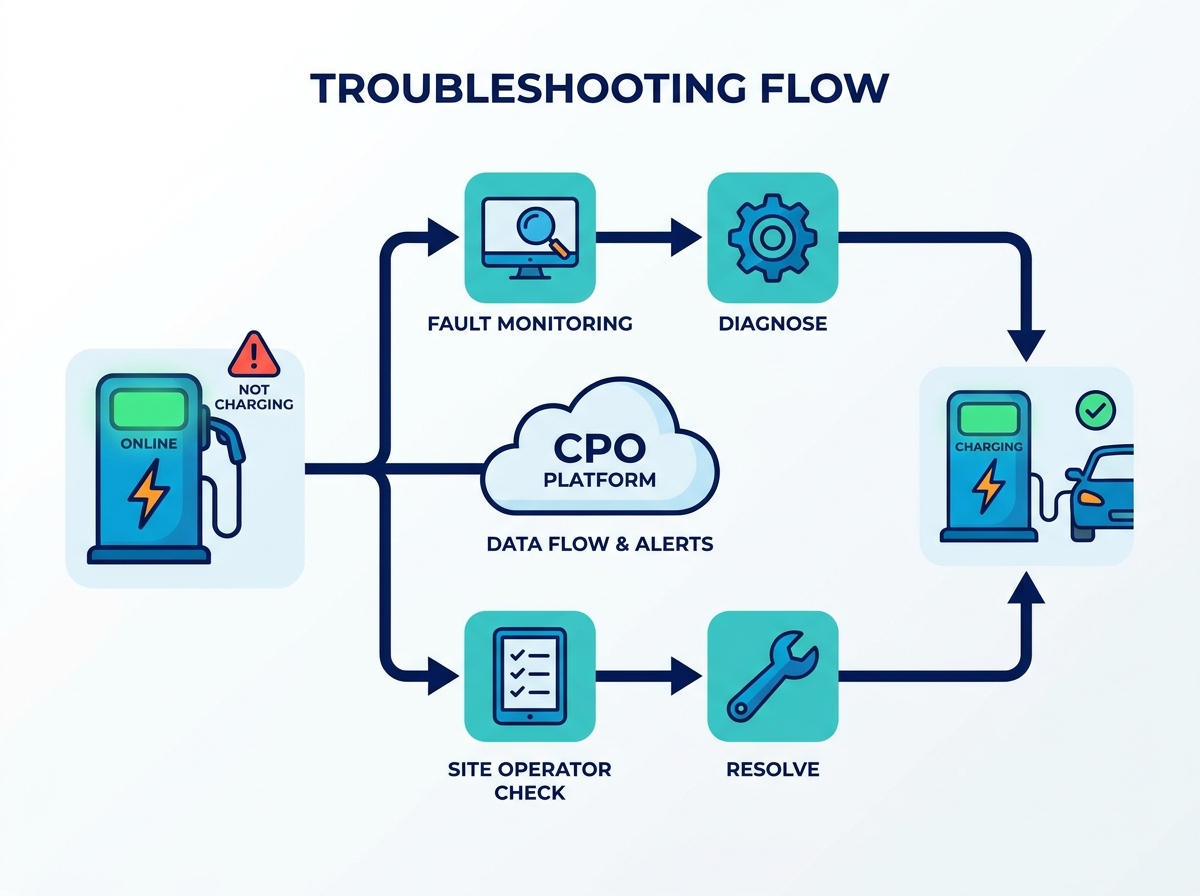
Diagnostic Flow: cais qhov txhaum
Theem 1: Lub Tsheb-rau-Chaw Nres Tsheb (Lub Cev & Cov Txheej Txheem)
Pab neeg txhawb nqa cov neeg siv khoom xav tau cov kauj ruam daws teeb meem. Peb hu qhov no 30-thib ob rov pib dua. Qhia tus neeg tsav tsheb kom tshem tawm lub charger hnyav. Qhia rau lawv kom tos raws nraim 30 vib nas this. Kom lawv ntsaws nws rov qab rau hauv lub tsheb chaw nres nkoj. Qhov kev ua haujlwm yooj yim no tshem tawm cov tsheb thauj mus los-sab software glitches. Nws tso cai rau cov capacitors nyob rau hauv lub tsheb lub onboard charging circuit kom tso tawm. Nws yuam kom lub khoos phis tawj onboard rov pib dua cov txheej txheem tuav tes los ntawm kos. Ib txwm sim ua qhov no ua ntej nce mus rau kev kuaj mob.
Kev sib tuav tes tso siab tag nrho ntawm Tus Neeg Tsav Tsheb Hauv Zej Zos (PP) thiab Tswj Pilot (CP) tus pins. Lub charger thiab lub tsheb hluav taws xob sib txuas lus ntawm cov pins tshwj xeeb hauv lub cable txuas. PP tus pin xyuas kom lub cable tau zaum tag nrho thiab txiav txim siab lub peev xwm tam sim no ntawm nws tus kheej. CP tus pin dictates qhov them tam sim no ntawm Pulse Width Modulation (PWM) teeb liab. Lub charger tso tawm 12V teeb liab ntawm CP tus pin. Thaum ntsaws rau hauv, lub tsheb rub qhov no mus rau 9V los qhia txog kev sib txuas, thiab tom qab ntawd mus rau 6V los thov lub zog. Yog hais tias av, corrosion, los yog ib tug bent pin tiv thaiv qhov tseeb voltage poob, qhov kev sib kho aborts. Lub chaw nres tsheb tseem nyob online, tab sis lub zog yuav tsis ntws.
Mechanical hnav thiab tsim kua muag rhuav tshem kev sib txuas ntawm lub cev sai sai hauv thaj teb. Cov neeg tsav tsheb tso cov khoom sib txuas ntawm cov pob zeb ua vaj tse. Pins khoov tawm ntawm kev sib dhos. Yas vaj tse tawg thiab tso cai rau ya raws. Latch mechanisms tsis koom nrog. Kev hloov hluav taws xob siab yuav tsum muaj kev ruaj ntseg, txheeb xyuas lub cev xauv. Yog tias lub latch tsis tuaj yeem nias rau hauv qhov chaw, cov ntsuas kev nyab xeeb thaiv qhov kev sib kho tam sim ntawd. Lub network dashboard tseem blissfully tsis paub txog cov yas latch tawg, uas qhia cov xwm txheej ntsuab icon.
Tsheb-sab software timeouts nquag masquerade li charger faults. Lub tsheb lub onboard charger (OBC) tswj AC zog hloov dua siab tshiab. Lub roj teeb tswj qhov system (BMS) saib xyuas tus kheej ntawm tes noj qab haus huv. Ob qhov system tuaj yeem tsis lees txais tus nqi nkag. Qhov kub thiab txias ambient quab yuam BMS los tiv thaiv lub roj teeb pob los ntawm kev tsis kam tam sim no. Software glitches nyob rau hauv lub tsheb firmware ua rau tam sim ntawd kev sib kho terminations. Cov neeg ua haujlwm feem ntau liam lub chaw nres tsheb thaum lub tsheb tsis kam lees lub zog.
Theem 2: Kev tso cai thiab kev sib txuas lus Backend
Cellular instability cuam tshuam qhov kev them nyiaj ib ntus. Spotty internet lossis tsis muaj zog txais xov tooj ntawm tes tau yooj yim xa cov OCPP lub plawv dhia, uas tsuas yog xav tau ob peb bytes ntawm cov ntaub ntawv. Qhov chaw nres tsheb nyob online. Txawm li cas los xij, kev pib sib tham yuav tsum muaj cov ntaub ntawv loj dua. Spotty kev sib txuas poob cov pob ntawv tseem ceeb no. App-based commands tsis ncav cuag lub rooj tsav xwm tswj. Tus neeg siv swipes lawv lub xov tooj, tab sis lub hardware yeej tsis tau txais cov lus txib pib.
High network latency ua rau token tsis lees paub. Tus neeg siv kais daim npav RFID. Lub chaw nres tsheb xa cov lus Authorize.req rau lub backend. High latency ncua kev teb. Lub zos maub los lub sij hawm tawm ua ntej tau txais validation. Lub backend nws thiaj li ua tiav qhov kev thov thiab xa qhov kev pom zoo, tab sis nws tuaj txog lig dhau lawm. Lub StartTransaction.req yeej tsis tshwm sim. Tus neeg tsav tsheb tawm hauv kev ntxhov siab, thaum lub log backend qhia tau tias muaj kev tso cai ua tiav yam tsis muaj kev hloov pauv hluav taws xob tom ntej.
Cov kab lus cuam tshuam ua rau OCPP lub xeev tsis sib haum. Lub charger tuaj yeem daig hauv lub xeev 'Preparing' lossis 'Finishing' xeev. Ib pob ntawv cov ntaub ntawv poob thaum lub sijhawm zaum kawg ntawm kev sib tham tawm ntawm lub software dai. Lub cev cable zaum hauv lub hnab, tab sis lub backend xav tias lub cable tseem ntsaws rau hauv lub tsheb. Qhov kev tsis sib haum xeeb no tiv thaiv cov kev sib tham tshiab los ntawm kev pib. Qhov chaw nres tsheb tshwm hauv online tab sis tsis kam lees txhua tus neeg siv tshiab kom txog thaum lub chaw taws teeb reboot tshem tawm lub xeev daig.
Theem 3: Kho vajtse thiab fais fab Electronics
Cov kauj ruam daws teeb meem txawv heev raws li hom kho vajtse. AC Theem 2 chaw nres tsheb yuav tsum tau ua kom pom tseeb ntawm cov contactors sab hauv thiab RCD (Residual Current Device) mus ncig ua si. Cov khoom siv no tswj cov AC raw khoom. Ib qho RCD tripped nres lub zog tam sim ntawd tab sis tawm ntawm lub rooj sib tham sib txuas lus. Rau qhov chaw muaj peev xwm siab, a DC fast charger nthuav qhia cov nyom nyuaj. Koj yuav tsum tsom mus rau lub hwj chim module tsis ua hauj lwm. Cov txee no muaj ntau yam AC-rau-DC rectifiers. Yog hais tias tus tswv module ua tsis tau, tag nrho cov dispenser kaw lub zog xa. Kev rho tawm ua txhaum cai nres kev sib tham tam sim kom tsis txhob muaj hluav taws xob. Cov kua cua txias sensor yuam kev txwv tsis pub xa hluav taws xob los tiv thaiv cable meltdowns. Kev sib txuas hauv lub network tseem ua haujlwm thoob plaws qhov kev ua haujlwm nyuaj nyuaj no.
Kev ntsuas lub cev kho vajtse xav tau cov neeg ua haujlwm tau txais kev cob qhia. Software diagnostics ib txwm los ua ntej. Thaum software tsis daws qhov teeb meem, koj yuav tsum xa tus kws tshaj lij. High-voltage kev nyab xeeb txaus ntshai xav tau cov txheej txheem nruj. Qhib lub DC ceev charger txee nthuav tawm cov kws tshaj lij rau cov qib siab tuag taus. Tsis txhob hla kev cuam tshuam kev nyab xeeb kom yuam kev sib tham. Cov kws kho mob yuav tsum txheeb xyuas qhov tsis muaj qhov hluav taws xob uas siv cov ntsuas ntsuas ntsuas ntsuas ua ntej kuaj cov busbars lossis contactors.
Cov cuab yeej cuab tam Legacy qhia txog kev pheej hmoo pom kev loj. Cov chaw qub qub ua tsis tau daim ntawv qhia kev kho vajtse yuam kev rau tus qauv OCPP txhaum cai. Lub zog module tshuab ib lub fuse. Tus tswj sab hauv sau npe qhov txhaum tab sis tsis muaj peev xwm firmware los txhais qhov no rau hauv OCPP StatusNotification.req. Tus neeg teb xov tooj tseem dig muag tag rau qhov txhaum hauv zos. Lub dashboard qhia pom lub cim ntsuab thaum kho vajtse zaum tuag.
Ntsuam xyuas EV Charging Fault Monitoring Capabilities
Reactive vs. Proactive Monitoring
Kev saib xyuas ping yooj yim muaj qhov tsawg kawg nkaus hauv cov txheej txheem niaj hnub no. Nws sawv cev rau ib txoj hauv kev zoo tshaj plaws. Koj tsuas paub tias qhov chaw nres tsheb ua tsis tiav tom qab tus neeg tsav tsheb yws. Advanced telemetry hloov koj lub tswv yim ua haujlwm. Koj xav tau lub zog EV them qhov txhaum xyuas kom noj cov ntaub ntawv tseem ceeb. Platforms yuav tsum txheeb xyuas qhov voltage, tam sim no, qhov kub thiab txias, thiab cov ncauj lus kom ntxaws kev sib tham hauv lub sijhawm. Cov ntaub ntawv no qhia txog kev noj qab haus huv tiag tiag ntawm cov khoom siv kho vajtse, txav koj cov haujlwm los ntawm kev tua hluav taws rov qab mus rau kev tswj xyuas kev ua haujlwm.
Predictive txij nkawm ntsuas txuag peev. Taug qab tshem tawm cov ntu tseem ceeb ua rau cov khoom sib txuas tsis zoo ua ntej lawv ua tsis tiav. Kev soj ntsuam kev tso cai rov ua dua qhia cov neeg nyeem RFID ua tsis tiav. Catch me me qhov kub thiab txias nyob rau hauv lub voj voog txias kwv yees cov twj tso kua mis tsis ua haujlwm. Koj tuaj yeem teem caij mus saib xyuas lub hom phiaj ua ntej cov khoom ua tsis tiav. Koj kho qhov teeb meem ua ntej cov neeg tsav tsheb ntsib qhov chaw nres tsheb tuag, tiv thaiv koj lub vev xaib lub koob npe nrov thiab cov nyiaj tau los.
Nta-rau-Tshaj Tawm: Yuav Ua Li Cas Rau Hauv CPO Charging Platform
Kev kuaj xyuas chaw taws teeb tshem tawm cov tsheb thauj khoom tsis tsim nyog. Ib tug kws kho mob mus ntsib tus nqi ntau pua daus las. Koj yuav tsum ntsuas cov yam ntxwv uas tso cai rau kev cuam tshuam rau tej thaj chaw deb. Lub peev xwm los tua cov chaw taws teeb mos thiab nyuaj rov pib dua ntawm Reset.req hais kom ua yog tsis sib tham. Pushing tej thaj chaw deb firmware hloov tshiab patches kab tsis muaj ib qhov chaw mus ntsib. Rub cov cav tshawb nrhiav tob tob ua rau koj pab pawg engineering cov ntaub ntawv lawv xav tau los cais cov kev ua txhaum nyuaj ua ntej xa cov neeg ua haujlwm lub cev.
Granular yuam kev code translation cais nruab nrab platforms los ntawm exceptional sawv daws yuav. Raw, cov chaw tsim khoom tshwj xeeb cov lej yuam kev tsis meej pem pab pawg. Ib tug hex code muab xoom cov ntsiab lus ua tau. Tus hwm CPO them platform txhais cov lej nyoos no tau txais. Nws hloov lawv mus rau hauv cov ntawv dawb, cov lus qhia ua tau zoo. Koj pab neeg txhawb nqa qib-ib tam sim ntawd paub seb puas yuav rov pib qhov chaw nres tsheb, nug tus neeg tsav tsheb los xyuas cov kab hluav taws xob, lossis xa cov hluav taws xob hluav taws xob siab.
| Raw OCPP yuam kev Code |
txhais lub ntsiab lus |
yuav tsum tau ua haujlwm |
| ConnectorLockFailure |
Lub cev latch ntawm lub cable tsis tuaj yeem koom nrog. |
Qhia tsav tsheb kom txhawb nqa cable hnyav; tshuaj xyuas cov yas tawg. |
| EVCommunicationError |
CP/PP tuav tes ua tsis tiav. |
Ua 30-thib ob rov pib dua; txheeb xyuas cov pins khoov hauv qhov txuas. |
| Kub kub |
Internal sensors ntes overheating. |
Txheeb xyuas cov twj tso kua mis txias ua haujlwm; xyuas qhov kub ntawm qhov chaw ambient. |
| Hauv avFailure |
Kev cais tawm tsis raug; txaus ntshai kev nyab xeeb. |
Dispatch certified high-voltage kws kho mob tam sim ntawd. |
Scalability, Ua raws cai, thiab kev pheej hmoo ntawm kev siv
Scalability thiab raws tu qauv
Kev siv cov qauv kev sib txuas lus tshiab tshiab txhim kho qhov kev kuaj mob tob. Kev lag luam vam khom rau OCPP 1.6J. Nws ua haujlwm yooj yim tswj kev sib tham zoo. Txawm li cas los xij, kev hloov mus rau OCPP 2.0.1 qhib kev ua haujlwm loj heev. Tus txheej txheem tshiab muaj kev tswj xyuas cov cuab yeej zoo dua. Nws muab kev txhim kho kev qhia yuam kev. Nws tso cai rau cov neeg ua haujlwm saib xyuas cov khoom ntiag tug hauv lub dispenser, xws li cov kiv cua txias tshwj xeeb lossis ib lub zog hluav taws xob, tsis yog tsuas yog tau txais qhov txhaum loj rau tag nrho cov chaw nres tsheb.
Hardware agnosticism ua kom lub sij hawm ntev scalability. Koj yuav muaj peev xwm siv ntau lub npe thiab qauv thoob plaws koj lub network raws li thev naus laus zis hloov zuj zus. Ib tug heterogeneous hardware network tsim cov ntaub ntawv silos yog tias koj software tsis tuaj yeem normalize lub telemetry. Koj lub platform yuav tsum tau noj cov ntaub ntawv tsis raug sib txawv thiab nthuav tawm lawv hauv lub dashboard sib koom ua ke. Qhov no normalization tso cai rau koj pab neeg siv ib qho kev daws teeb meem ntws thoob plaws txhua qhov chaw, tsis hais cov chaw tsim khoom tsim lub cev lub cev.
Kev nqis tes ua thiab txo qis kev lag luam tawm
Cov neeg ua haujlwm ntsib kev lag luam nruj ntawm kev lag luam ntawm software thiab kho vajtse mitigation. Kev nqis peev hauv qhov hwm software backend nce koj cov nuj nqis ua haujlwm txhua hli. Txawm li cas los xij, qhov kev nqis peev no txo qis cov nqi kho lub cev. Zam tsuas yog ob lub tsheb thauj khoom tsis tsim nyog nyob rau ib hlis feem ntau them rau cov nqi them nqi software. Software mitigation muab ib qho nyiaj rov qab ntau dua ntawm kev nqis peev ntau dua li kev hloov kho cov khoom qub.
Tus neeg muag khoom kaw-hauv ua rau muaj kev pheej hmoo loj rau koj txoj kev ywj pheej ua haujlwm. Cov cuab yeej tshuaj ntsuam xyuas tus kheej yuam kom koj tso siab rau ntawm pab pawg neeg tsim khoom kho vajtse. Koj poob kev tswj hwm koj qhov kev saib xyuas SLAs thiab lub sijhawm teb. Tus kws lij choj rau kev sib tham qhib-txoj cai. Xyuas kom koj muaj koj cov ntaub ntawv kuaj mob thiab tuaj yeem xa mus rau lwm tus neeg saib xyuas yog tias tsim nyog.
Cov ntaub ntawv overload ua rau ceeb toom qaug zog. Ib qho kev soj ntsuam zoo heev ua rau ntau txhiab qhov kev ceeb toom txhua hnub. Tus neeg siv ntsaws rau hauv thiab tshem tawm tam sim ntawd ua rau qhov yuam kev. Koj lub kaw lus yuav tsum lim cov kev ua yuam kev tam sim no. Nws yuav tsum cais cov neeg siv tus cwj pwm tsis zoo los ntawm cov khoom kho vajtse tiag. Yog tsis muaj kev lim dej ntse, koj pab neeg txhawb nqa yuav tsis quav ntsej lub dashboard nkaus, kov yeej lub hom phiaj ntawm kev tshaj xov tooj cua.
Xaus
Lub xeev 'online tab sis tsis them' qhia txog qhov tsis pom kev tseem ceeb hauv koj lub network. Nws ua pov thawj tias koj tam sim no telemetry tsuas yog taug qab kev sib txuas hauv network, tsis quav ntsej txog kev ua haujlwm kho vajtse tiag tiag thiab kev sib koom tes ntawm lub tsheb. Kev cia siab rau lub cim ntsuab yooj yim tau lees paub qhov chaw tsis pom kev ua haujlwm, kev siv nyiaj tsis siv nyiaj, thiab cov neeg tsav tsheb ntxhov siab.
Koj yuav tsum tshawb xyuas koj cov peev txheej software tam sim no. Ntsuas nws lub peev xwm los txheeb xyuas cov lej OCPP yuam kev, saib xyuas cov teeb liab ntawm lub zog, thiab ua rau cov chaw taws teeb rov pib dua. Yog tias koj qhov system tam sim no tsuas yog muab binary online / offline raws li txoj cai, nws yog lub sijhawm los ntsuas cov kev tswj hwm qib siab uas muaj qhov pom kev sib sib zog nqus.
Ua cov haujlwm tam sim no kom ruaj khov koj lub network:
- Tshawb xyuas cov ntawv teev kev hloov pauv ntawm koj cov teeb meem feem ntau cov chargers txhawm rau txheeb xyuas cov qauv hauv kev sib kho aborts thiab kev tso cai timeouts.
- Qeb koj cov ntsiab lus tsis ua hauj lwm rau hauv kev sib tuav tes yuam kev, teeb meem network latency, thiab kev ua txhaum ntawm lub cev.
- Hloov kho koj qhov kev saib xyuas SLAs kom yuav tsum muaj kev sim tshuaj ntsuam xyuas tej thaj chaw deb, suav nrog kev rov pib dua, ua ntej xa cov kws kho lub cev.
- Ua raws li kev cai nruj 30-thib ob rov pib dua rau txhua tus neeg tsav tsheb txhawb kev hu xov tooj kom tshem tawm cov tsheb-sab software glitches ua ntej nce daim pib.
FAQ
Q: Vim li cas kuv lub charger EV hais online tab sis yuav tsis pib qhov kev sib tham?
A: Cov xwm txheej hauv online tsuas yog txhais tau hais tias lub charger lub router sib txuas lus nrog lub network. Nws tsis txhais hais tias lub cev kho vajtse ua haujlwm. Lub charger tej zaum yuav muaj qhov sib txuas ntawm cov hlua khi, khoov cov pins sib txuas, lossis lub tsheb-sab software glitch tiv thaiv qhov yuav tsum tau muaj kev ruaj ntseg tuav tes yuav tsum pib xa hluav taws xob siab.
Q: Dab tsi yog qhov teeb meem ntawm tsheb-sab tes tuav?
A: Lub charger thiab lub tsheb yuav tsum sib txuas lus los ntawm Control Pilot (CP) thiab Proximity Pilot (PP) pins ua ntej them nyiaj pib. Yog hais tias lub tsheb lub roj teeb tswj qhov system pom qhov tsis zoo, qhov kub thiab txias, lossis kev sib txuas ntawm lub cev tsis zoo, nws yuav tsis lees txais qhov nqi. Lub chaw nres tsheb tseem nyob online, tab sis lub tsheb tsis kam lub hwj chim.
Q: Vim li cas lub charger qhia tias nws nquag tab sis xa 0kW?
A: Ib qho kev sib kho tuaj yeem tso cai ua tiav thaum xa tawm lub zog xoom vim muaj kev txwv sab nraud. Aggressive load tswj software yuav throttle lub charger mus rau 0kW los tiv thaiv daim phiaj overload. Xwb, qhov chaw nres tsheb thermal sensors tuaj yeem txiav fais fab kom tsis txhob muaj cua sov, lossis lub tsheb nws tus kheej tuaj yeem thov 0kW vim lub roj teeb puv.
Q: Kuv yuav rov pib dua lub charger DC ceev uas yuav tsis them li cas?
A: Ua ntej, sim qhov chaw taws teeb rov pib dua ntawm koj lub chaw tswj hwm siv OCPP Reset.req hais kom ua. Qhov no clears software hangs yam tsis muaj ib qhov chaw mus ntsib. Yog hais tias tej thaj chaw deb sim ua tsis tau, ib tug kws kho mob uas muaj ntawv pov thawj yuav tsum tau ua lub cev hard reset. Tsis txhob sim hla kev cuam tshuam kev nyab xeeb lossis qhib cov khoom siv hluav taws xob uas tsis muaj ntawv pov thawj tsim nyog.
Q: Lub CPO them lub platform puas tuaj yeem txhim kho kev them nyiaj tsis raug?
A: Yog lawm, cov platforms siab heev tuaj yeem daws ntau yam software-raws li qhov yuam kev nyob deb. Lawv tuaj yeem ua cov reboots mos, tshem tawm OCPP lub xeev, thawb firmware hloov tshiab, thiab rov pib tso cai modules. Txawm li cas los xij, lawv tsis tuaj yeem kho lub cev tsis ua haujlwm xws li cov welded contactors, cov kab hluav taws xob tawg, lossis cov tshuab hluav taws xob tawg, uas yuav tsum tau xa cov kws tshaj lij lub cev.
Q: Dab tsi OCPP cov lej yuam kev qhia tias lub charger nyob online tab sis ua tsis tau?
A: Cov lej feem ntau suav nrog EVCommunicationError rau kev tuav tes ua tsis tiav, ConnectorLockFailure rau lub cev lub cev tawg, thiab InternalError rau kho vajtse txhaum. Lub chaw nres tsheb xa cov lej no yuav tuav nws txoj kev sib txuas hauv network thiab tshwm hauv online, tab sis nws yuav tsis kam lees lossis rho tawm tag nrho cov kev them nqi kom txog thaum qhov kev ua txhaum tshwj xeeb raug daws.


