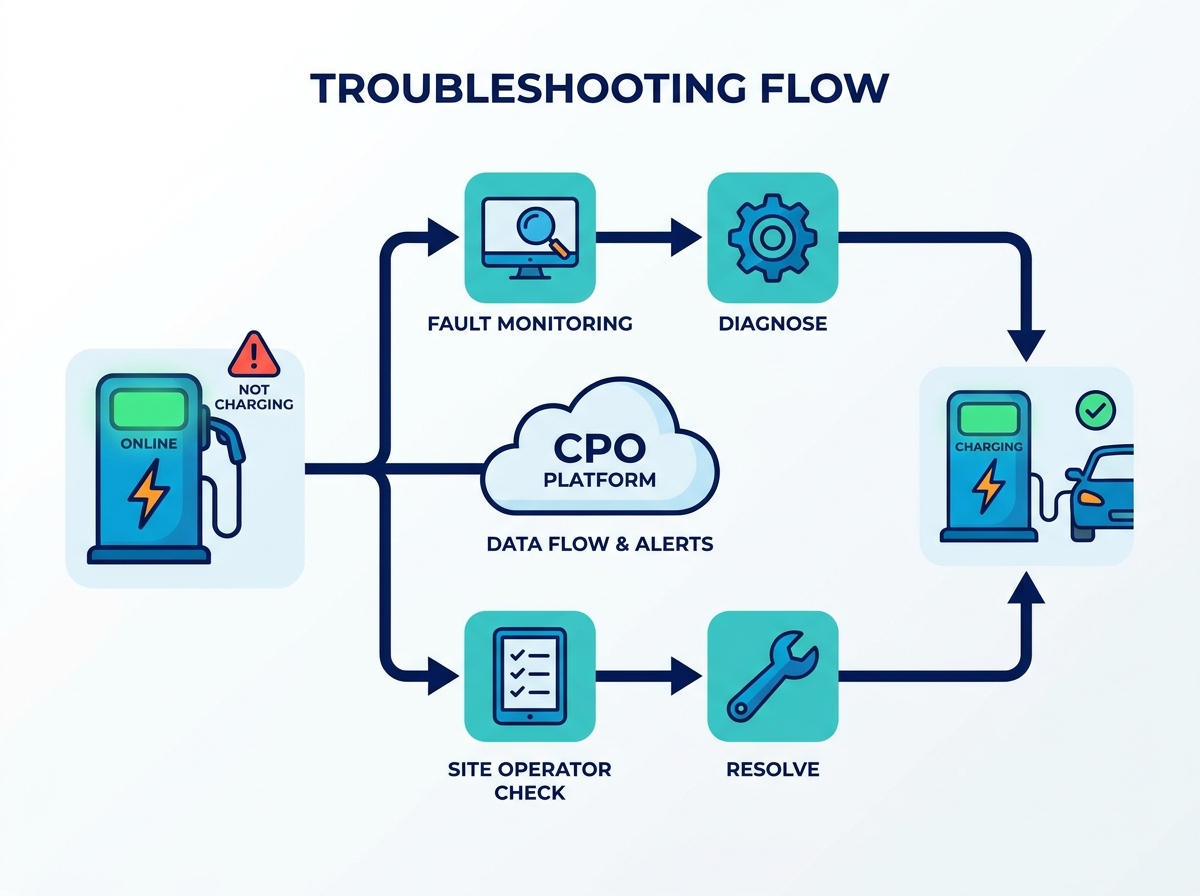
Site operators frequently encounter a specific operational frustration known as the false positive. Your central dashboard displays a healthy, green icon. The network confirms a steady connection. Yet, drivers remain stranded at the station because the hardware fails to initiate a charge. When you encounter an EV charger online but not charging, you face a critical visibility gap. This discrepancy directly impacts your reputation and operational efficiency.
An "online" status only confirms basic network connectivity. It verifies a digital heartbeat but does not guarantee functional power delivery. This blind spot leads to severe business consequences. You experience SLA breaches, lose charging revenue, and waste capital rolling maintenance trucks for simple software glitches. Frustrated drivers abandon your site for competitors. Solving this requires a systematic, evidence-based troubleshooting flow. You must isolate faults between the network, the hardware, and the vehicle. We will explore how advanced software infrastructure mitigates these blind spots and keeps your stations dispensing power.
An "online" status merely indicates an active network ping or basic OCPP heartbeat; it does not guarantee the power electronics, cellular bandwidth, or vehicle handshake mechanisms are functioning.
Isolating an "EV charger online but not charging" fault requires a strict diagnostic hierarchy: checking physical connections (CP/PP pins), authorization sequences, and internal hardware faults.
Relying on manual troubleshooting is unscalable; operators must evaluate their CPO charging platform for deep EV charging fault monitoring capabilities, such as remote rebooting, granular OCPP error log parsing, and load management visibility.
Upgrading diagnostic software often yields a higher ROI than replacing hardware by drastically reducing unnecessary physical maintenance dispatches and empowering support teams to resolve transient errors remotely.
The "False Positive" Dilemma: Understanding Charger Telemetry
Network status in electric vehicle infrastructure often misleads operators. A charger sends a regular heartbeat payload to the backend management system. This payload proves the communication module remains active. It confirms the router, modem, and primary controller board have power. It proves nothing about the high-voltage components. The backend registers the station as available, but the reality on the ground often tells a different story.
To understand this disconnect, you must understand what a basic network ping actually verifies. When a station shows as online, the system only confirms a few low-voltage components are functioning:
The internal modem receives adequate power from the 12V or 24V DC power supply.
The cellular antenna or Ethernet cable maintains a link to the local internet service provider.
The primary logic board successfully executes its boot sequence and runs the operating system.
The software establishes a basic WebSocket connection to the central server to transmit OCPP messages.
A massive gap exists between digital connectivity and physical power delivery. A station can maintain a perfect internet connection while suffering catastrophic mechanical failures. Internal contactors weld shut after thousands of cycles. Liquid cooling pumps fail, triggering thermal shutdowns. Heavy cables suffer internal copper wire damage from repeated drops. The communication board continues sending its heartbeat. The operator sees a healthy station, while the driver sees a broken machine.
Operators also face the 0kW charging illusion. A session technically starts in the software. The authorization clears, and the contactors close. However, the station delivers zero power. Aggressive load balancing settings often cause this phenomenon. The site power supply reaches its maximum threshold. The local controller throttles the specific dispenser to 0kW to prevent a grid overload. Thermal throttling produces the same result. The hardware protects itself from overheating by cutting current. The user app shows an active session, but the vehicle battery receives nothing.
You must redefine success criteria for network monitoring. Moving from binary monitoring to state-based monitoring is mandatory. Knowing a station is online or offline provides insufficient data. You must track granular states. You need visibility into available, preparing, charging, and faulted statuses. High-fidelity error reporting bridges the gap between a simple network ping and actual hardware performance.
Monitoring Type
Data Collected
Operational Blind Spots
Field Outcome
Binary Monitoring
Ping response, basic online/offline status.
Hardware faults, cable damage, load limits.
High rate of false positives; drivers stranded at "online" stations.
State-Based Monitoring
OCPP status (Preparing, Charging, Finishing).
Internal component temperatures, exact voltage drops.
Better visibility, but still misses localized hardware degradation.
Advanced Telemetry
Meter values, phase voltages, error codes, temperatures.
None. Provides complete visibility into the dispenser.
Proactive maintenance; remote resolution of software hangs.
Diagnostic Flow: Isolating the Fault
Phase 1: The Vehicle-to-Charger Handshake (Physical & Protocol)
Customer support teams need a baseline troubleshooting step. We call this the 30-second reset. Instruct the driver to unplug the heavy charging cable. Tell them to wait exactly 30 seconds. Have them plug it back into the vehicle port. This simple action clears transient vehicle-side software glitches. It allows the capacitors in the vehicle's onboard charging circuit to discharge. It forces the onboard computer to restart the handshake protocol from scratch. Always attempt this before escalating to technical diagnostics.
The handshake relies entirely on the Proximity Pilot (PP) and Control Pilot (CP) pins. The charger and the electric vehicle communicate via these specific pins inside the cable connector. The PP pin ensures the cable is fully seated and determines the maximum current capacity of the cable itself. The CP pin dictates the charging current via a Pulse Width Modulation (PWM) signal. The charger outputs a 12V signal on the CP pin. When plugged in, the vehicle pulls this down to 9V to indicate a connection, and then to 6V to request power. If dirt, corrosion, or a bent pin prevents this exact voltage drop, the session aborts. The station remains online, but power will never flow.
Mechanical wear and tear destroys physical connections rapidly in the field. Drivers drop connectors on concrete floors. Pins bend out of alignment. Plastic housings crack and allow moisture ingress. Latch mechanisms fail to engage. High-voltage transfer requires a secure, verified physical lock. If the latch cannot click into place, the safety sensors block the session immediately. The network dashboard remains blissfully unaware of the broken plastic latch, showing a green status icon.
Vehicle-side software timeouts frequently masquerade as charger faults. The vehicle's onboard charger (OBC) manages AC power conversion. The battery management system (BMS) monitors individual cell health. Either system can reject an incoming charge. Extreme ambient temperatures force the BMS to protect the battery pack by refusing high current. Software glitches in the vehicle firmware cause sudden session terminations. Operators often blame the station when the vehicle actively refuses the power.
Phase 2: Authorization and Backend Communication
Cellular instability disrupts the charging sequence. Spotty internet or weak cellular reception easily transmits a lightweight OCPP heartbeat, which only requires a few bytes of data. The station stays online. However, session initiation requires larger data packets. Spotty connections drop these critical packets. App-based commands fail to reach the controller board. The user swipes their phone, but the hardware never receives the start command.
High network latency causes token rejection. A user taps an RFID card. The station sends an Authorize.req message to the backend. High latency delays the response. The local controller times out before receiving validation. The backend eventually processes the request and sends the approval, but it arrives too late. The StartTransaction.req never triggers. The driver leaves in frustration, while the backend logs show a successful authorization with no subsequent energy transfer.
Interrupted message sequences create OCPP state mismatches. A charger can get stuck in a "Preparing" or "Finishing" state. A dropped data packet during the final seconds of a session leaves the software hanging. The physical cable sits in the holster, but the backend thinks the cable remains plugged into a vehicle. This mismatch prevents new sessions from initiating. The station appears online but refuses all new users until a remote reboot clears the stuck state.
Phase 3: Hardware and Power Electronics
Troubleshooting steps differ drastically based on hardware type. AC Level 2 stations require specific focus on internal contactors and RCD (Residual Current Device) trips. These components handle the raw AC flow. A tripped RCD halts power instantly but leaves the communication board powered. For high-capacity sites, a DC fast charger presents complex challenges. You must focus on power module failures. These cabinets contain multiple AC-to-DC rectifiers. If a master module fails, the entire dispenser shuts down power delivery. Isolation faults halt sessions immediately to prevent electrocution. Liquid cooling sensor errors stop power delivery to prevent cable meltdowns. The network connection remains active throughout these critical hardware failures.
Physical hardware assessments require highly trained personnel. Software diagnostics always come first. When software fails to resolve the issue, you must dispatch a technician. High-voltage safety risks demand strict protocols. Opening a DC fast charger cabinet exposes technicians to lethal voltage levels. Never bypass safety interlocks to force a session. Technicians must verify the absence of voltage using calibrated multimeters before inspecting internal busbars or contactors.
Legacy hardware introduces a severe visibility risk. Older stations fail to map internal hardware errors to standard OCPP fault codes. A power module blows a fuse. The internal controller registers the fault but lacks the firmware capability to translate this into an OCPP StatusNotification.req. The operator remains completely blind to the local fault. The dashboard shows a green icon while the hardware sits dead.
Evaluating EV Charging Fault Monitoring Capabilities
Reactive vs. Proactive Monitoring
Basic ping monitoring offers minimal value in modern infrastructure. It represents a purely reactive approach. You only know a station has failed after a driver complains. Advanced telemetry transforms your operational strategy. You need robust EV charging fault monitoring to ingest critical data. Platforms must analyze voltage, current, temperature, and detailed session logs in real-time. This data reveals the true health of the hardware, moving your operations from reactive firefighting to proactive management.
Predictive maintenance indicators save capital. Tracking aborted sessions highlights degrading connectors before they fail completely. Monitoring authorization retries exposes failing RFID readers. Catching minor temperature spikes in the cooling loop predicts pump failures. You can schedule a targeted maintenance visit before the component completely fails. You fix the problem before drivers experience a dead station, protecting your site's reputation and revenue stream.
Features-to-Outcomes: What to Look For in a CPO Charging Platform
Remote diagnostics eliminate unnecessary truck rolls. A technician visit costs hundreds of dollars. You must evaluate features that allow remote intervention. The ability to execute remote soft and hard resets via a Reset.req command is non-negotiable. Pushing remote firmware updates patches bugs without a site visit. Pulling deep diagnostic logs remotely gives your engineering team the data they need to isolate complex faults before dispatching a physical crew.
Granular error code translation separates average platforms from exceptional ones. Raw, manufacturer-specific error codes confuse support teams. A hex code provides zero actionable context. A premium CPO charging platform translates these raw codes automatically. It converts them into plain-text, actionable instructions. Your tier-one support team instantly knows whether to reset the station, ask the driver to check the cable, or dispatch a high-voltage electrician.
Raw OCPP Error Code
Translated Meaning
Required Operator Action
ConnectorLockFailure
The physical latch on the cable cannot engage.
Instruct driver to support cable weight; inspect for broken plastic.
EVCommunicationError
The CP/PP handshake failed to complete.
Perform 30-second reset; check for bent pins in the connector.
HighTemperature
Internal sensors detect overheating.
Verify cooling pump operation; check ambient site temperature.
Adopting newer communication standards improves diagnostic depth. The industry relies heavily on OCPP 1.6J. It handles basic session management well. However, transitioning to OCPP 2.0.1 unlocks massive operational advantages. The newer standard offers superior device management. It provides improved fault reporting structures. It allows operators to monitor individual components within the dispenser, such as a specific cooling fan or a single power module, rather than just receiving a generic fault for the entire station.
Hardware agnosticism ensures long-term scalability. You will likely deploy multiple brands and models across your network as technology evolves. A heterogeneous hardware network creates data silos if your software cannot normalize the telemetry. Your platform must ingest varying fault data formats and present them in a unified dashboard. This normalization allows your team to apply a single troubleshooting flow across all sites, regardless of which manufacturer built the physical dispenser.
Implementation Risks and Mitigation Trade-Offs
Operators face strict operational trade-offs between software and hardware mitigation. Investing in a premium software backend increases your monthly operational expenditure. However, this investment drastically reduces physical maintenance costs. Avoiding just two unnecessary truck rolls per month often covers the premium software subscription. Software mitigation provides a much higher return on investment than preemptively replacing aging hardware.
Vendor lock-in poses a severe risk to your operational independence. Proprietary diagnostic tools force you to rely exclusively on the hardware manufacturer's support team. You lose control over your maintenance SLAs and response times. Advocate for open-protocol interoperability. Ensure you own your diagnostic data and can route it to third-party maintenance providers if necessary.
Data overload causes alert fatigue. A highly sensitive monitoring system generates thousands of alerts daily. A user plugging in and immediately unplugging triggers an error code. Your system must filter these transient errors. It must separate user behavior anomalies from genuine hardware faults. Without intelligent filtering, your support team will ignore the dashboard entirely, defeating the purpose of advanced telemetry.
Conclusion
An "online but not charging" state highlights a critical visibility gap in your network. It proves your current telemetry only tracks basic network connectivity, ignoring actual hardware performance and vehicle handshake integrity. Relying on a simple green icon guarantees operational blind spots, wasted maintenance budgets, and frustrated drivers.
You must audit your current software capabilities immediately. Evaluate its ability to parse granular OCPP error codes, monitor cellular signal strength, and execute remote resets. If your current system only provides binary online/offline status, it is time to evaluate advanced management platforms that offer deep diagnostic visibility.
Take these immediate actions to stabilize your network:
Review the transaction logs of your most problematic chargers to identify patterns in session aborts and authorization timeouts.
Categorize your failure points into handshake errors, network latency issues, and physical hardware faults.
Update your maintenance SLAs to require mandatory remote diagnostic attempts, including soft resets, before dispatching any physical technicians.
Implement a strict 30-second reset protocol for all driver support calls to eliminate vehicle-side software glitches before escalating tickets.
FAQ
Q: Why does my EV charger say online but won't start a session?
A: An online status only means the charger's router is communicating with the network. It does not mean the physical hardware is functioning. The charger may have a broken connector latch, bent communication pins, or a vehicle-side software glitch preventing the mandatory safety handshake required to initiate high-voltage power delivery.
Q: What is a vehicle-side handshake problem?
A: The charger and vehicle must communicate via the Control Pilot (CP) and Proximity Pilot (PP) pins before charging begins. If the vehicle's battery management system detects an anomaly, extreme temperatures, or a poor physical connection, it will reject the charge. The station remains online, but the vehicle refuses the power.
Q: Why does the charger show it is active but delivering 0kW?
A: A session can authorize successfully while delivering zero power due to external constraints. Aggressive load management software may throttle the charger to 0kW to prevent grid overload. Alternatively, the station's thermal sensors may cut power to prevent overheating, or the vehicle itself may request 0kW due to a full battery.
Q: How do I reset a DC fast charger that won't charge?
A: First, attempt a remote soft reset via your management platform using an OCPP Reset.req command. This clears software hangs without a site visit. If remote attempts fail, a certified technician must perform a physical hard reset. Never attempt to bypass safety interlocks or open high-voltage cabinets without proper certification.
Q: Can a CPO charging platform fix charging errors remotely?
A: Yes, advanced platforms can resolve many software-based errors remotely. They can execute soft reboots, clear stuck OCPP states, push firmware updates, and reset authorization modules. However, they cannot fix physical hardware failures like welded contactors, broken cables, or blown power modules, which require a physical technician dispatch.
Q: What OCPP error codes indicate a charger is online but failing?
A: Common codes include EVCommunicationError for handshake failures, ConnectorLockFailure for broken physical latches, and InternalError for hardware faults. A station transmitting these codes will maintain its network connection and appear online, but it will actively reject or abort all charging sessions until the specific fault is resolved.